
VIDEO EDITING
Short-form Video for Clients
Make a captioned client clip and scope the service.
Turn footage into a clear, captioned clip a business can review. Learn the editing workflow, then define a small service with a brief, delivery checks and a pilot proposal.
5 text lessons · English · Self-paced
Best fit: You can use a desktop editor and permitted source footage.
Plan 4–6 practice hours; editing speed will vary. Suggested plan; reading and feedback can add time.
Get Short-form Video for ClientsUS$29 · one-time payment · full lessons + filesPurchase details
Your course, ready to open.
This course includes all its lessons and the listed project files. Other courses and software subscriptions are separate.
- Enter the email you want to use for access.
- Review the terms and continue to PayPal.
- After verified payment, open every included lesson and download your files.
Already own an included course? Restore your purchase before buying again. No automatic upgrade credit applies.
Used for purchase delivery and recovery. No account or password needed. Privacy.
Read the terms and refund policy before paying.
Availability is checked securely before checkout. Access opens after verified payment.
01 / COURSE OVERVIEW
What you will learn
- Plan one clip around an audience and a message.
- Practise editing, subtitles, rights checks and export review.
- Define deliverables, revisions and a fee scenario before offering a pilot.
Who this is for
You enjoy visual work and want to practise a service you could offer to businesses or creators.
02 / THE LEARNING PATH
Course curriculum
- Free lesson below
Give the clip one job and shoot five useful moments
Create a five-shot brief and original practice footage without finding a client, buying equipment, or using a paid editor.
Check the material and build a clean project
Make a rights-and-use log, a simple edit plan, and a project folder that separates approved sources from exports.
Make the first cut, add readable words, and export
Export a short original practice clip and a checked caption file, then inspect the actual output rather than only the editor preview.
Offer a small pilot you can actually deliver
Draft a scoped one-clip pilot, a respectful research message, and an approval process without pretending clients are supplied.
Count the whole job, not just the quoted fee
Complete a hypothetical or actual project cost record and use delivery evidence and total time to decide the next pilot scope.
FREE FIRST LESSON / NO EMAIL REQUIRED
The lesson starts here
Give the clip one job and shoot five useful moments
Create a five-shot brief and original practice footage without finding a client, buying equipment, or using a paid editor.
Do not begin with make something viral. Give the clip one job: show a process, answer a product question, or demonstrate what a customer should expect. One visible action is enough for a first practice clip. If you cannot explain its job in a sentence, narrow it before filming.
Write a mini brief: viewer, question, action, visible result, next step, and what you must not claim. Choose a task you can film safely with your own objects. Avoid private documents, faces without permission, background television or music, and a customer's brand assets until you have permission. The free practice path uses your own material, not someone else's popular clip.
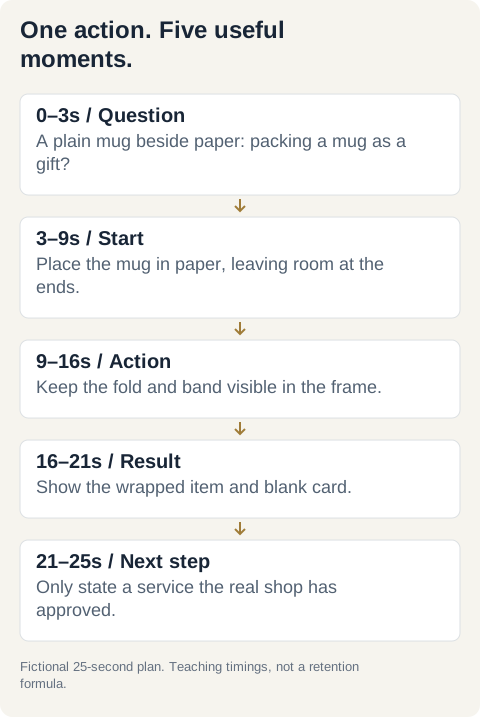
Plan five moments: the question, starting materials, main action, finished result, and a truthful next step. For a roughly 25-second practice edit, a useful teaching plan is 3 + 6 + 7 + 5 + 4 seconds. These are working choices, not an algorithm formula or a promise of retention.
Record vertically if that is your intended deliverable. Use a stable position and light that lets the action be seen. Check the framing before each take. Leave a little footage before and after the useful action so you can trim later. Capture enough material for the five moments, then watch the originals once. The important step should remain visible and understandable. If it is hidden by your hands, reshoot now rather than hoping an effect will fix it.
This lesson ends with a useful brief and raw footage. Editing comes later. No real client, paid application, stock asset, or public upload is required.
Worked example
Fictional worked example — Mina practices with her own plain mug, paper, a band, and a blank card. The imaginary client context is a small pottery shop, but no real shop or client approval is claimed.
Completed brief: Viewer, an adult considering a gift; Question, how does the mug get wrapped? Action, show one wrapping sequence; Result, a wrapped mug with a card; Next step, ask the shop about gift wrapping only if a real shop approves that statement; Do not claim, free wrapping, guaranteed protection, delivery dates, or more sales.
Five-shot plan: 0–3 seconds, mug beside paper and the question; 3–9, place the mug; 9–16, fold and add the band; 16–21, show the finished item and card; 21–25, a clear next step. Mina records five takes totaling 46 seconds, leaving trim room around the actions. During her fictional review, her hand blocks the band, so she reshoots that moment.
Deliverable: the dated brief, five numbered original takes, and a note that the main action is now visible. These are invented practice details, not evidence of a client project, view count, or paid result.
Your exercise
1. Choose one ordinary process you can demonstrate with your own materials. Write the six brief fields from the lesson.
2. Draw five simple boxes on paper and label what the viewer will see in each. Add target durations totaling about 25 seconds; the final timing can change after watching the footage.
3. Record five short vertical takes, about 30–60 seconds of usable raw material in total. Do not record private details or people who have not agreed.
4. Watch them without explaining. Check whether the main action and finished result are visible. Reshoot a blocked or blurry moment.
5. Name the files in order, such as 01-question through 05-next-step, and write one sentence describing the intended output.
6. Save your brief and footage privately. Do not claim a client approved it or a platform rewarded it. If filming is currently impossible, keep the shot plan and label footage Pending rather than pretending it exists.
Your finished work
A five-shot brief and numbered original raw takes, with a visibility check. If footage is pending, submit an honest shot plan and blocker instead.
Check your work
- The clip has one viewer, question, action, result, and truthful next step.
- The plan avoids claims the footage cannot support.
- Material is self-owned or properly permitted, without private details or unapproved people.
- All five moments are planned with a sensible sequence.
- Actual footage is reviewed for visible action, or clearly marked Pending.
- No client, purchase, paid editor, public upload, or performance result is required.
References & further reading
Keep the project you made. Check the full course status and requirements before choosing your next step.
Review course access & files04 / YOUR NEXT STEP
Course access & project materials
5 text lessons and the following project materials are included in one purchase.
- Short-form Video for Clients course guidePDF
- Offline project workspaceHTML
- Completed fictional projectJSON
- Uncaptioned teaching masterMP4
- Captioned teaching referenceMP4
- Reference caption fileSRT
Restore an existing purchase. Online lessons and their working files are one purchase; check overlap before buying again.
Tools and requirements
- Age 18 or older.
- A phone or permitted footage, an existing supported computer for the Shotcut path, and a way to store a small project.
- Permission for every customer asset before client work or publication; self-owned practice material can be used instead.
- No paid editor, stock library, AI API, course purchase, or real client is required for practice.
- Publishing, paid pilots, and client approvals are separate actions taken only when actually ready and authorized.
The course uses Shotcut on a supported computer and owned or permitted footage. Paid editing software is not required for the exercises.
Format, outcomes and access
These are English text lessons with examples and practical exercises. There is no video library, personal coaching or certificate. Examples are teaching scenarios, not student results. Income, clients, sales and platform approval are not guaranteed.
Open purchases provide all included lessons immediately after verified payment. Your purchase email restores access without a password. Keep your downloaded files; permanent online hosting is not promised. Read the purchase terms before checkout.